



We handle millions in Instagram ad spend every single day, and we’ve seen our efforts drive the cost-per-result drop for many of our clients.
If you’re new to Instagram ads, or even if you’ve been running them for a while…
…you’ll want to figure out how to lower your Instagram ad costs, because lowering your ad costs means more money in your pocket.
Maybe you keep hearing success stories about how people are achieving great results on Instagram, either from our blog or from your friends.
But unfortunately, you just can’t seem to get the same outcome.
If that sounds like you, keep reading.
Because today, we’re covering the 7 step checklist of things you can do to lower your Instagram ad costs and maximize your profit.
But before we get into our checklist, let’s first discuss the way Instagram advertising costs work really quickly.
How Do Instagram Ad Costs Work?
Facebook owns Instagram, so you perform your Instagram advertising in Facebook Ads Manager.
When you’re there, you’ll have to select the campaign objective you want to run.
The key thing to note here is that different campaigns charge for different things. Check out this example:
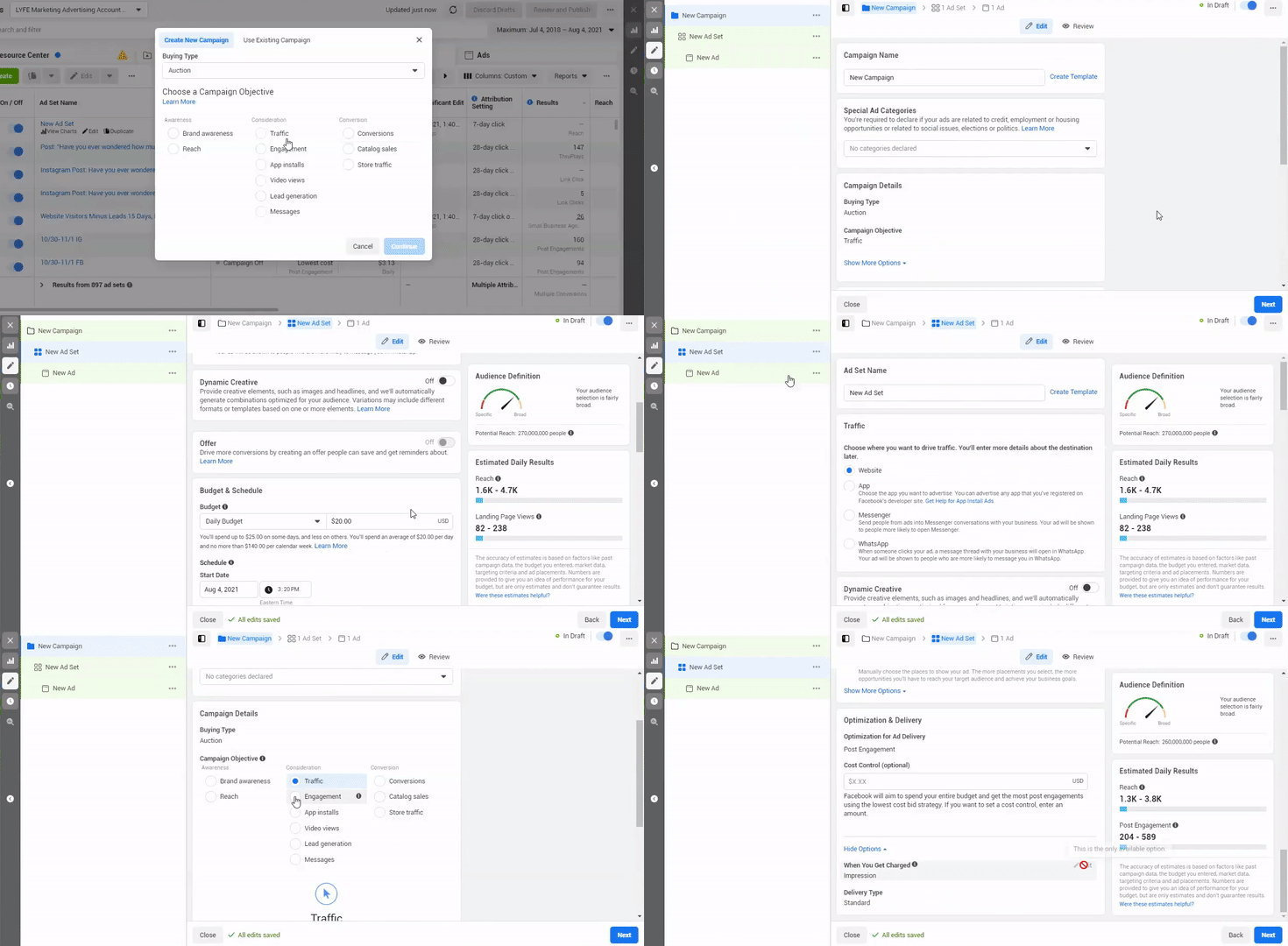
- When you go to “Create a campaign”, you first have the option to choose your buying type between auction, and reach and frequency.
And you can see that it immediately limits your objectives to choose from.
- We always go with auction, so we’re going to click that and it’s going to open a new campaign for us.
- And then, we’re going to click to the ad set level.
- From there, scroll down to Optimization & Delivery and click Show More Options.
- And then look at “When you get charged”. If you hover your mouse over it, you can click Edit and choose between the options it gives you.
For the traffic campaign that we selected, we can choose between impressions and link clicks.
- But if you go back and change your campaign objectives to conversions, for example…
…and go back to the Optimization & Delivery section, you can see that it will not let us edit it. It makes us keep it on impressions.
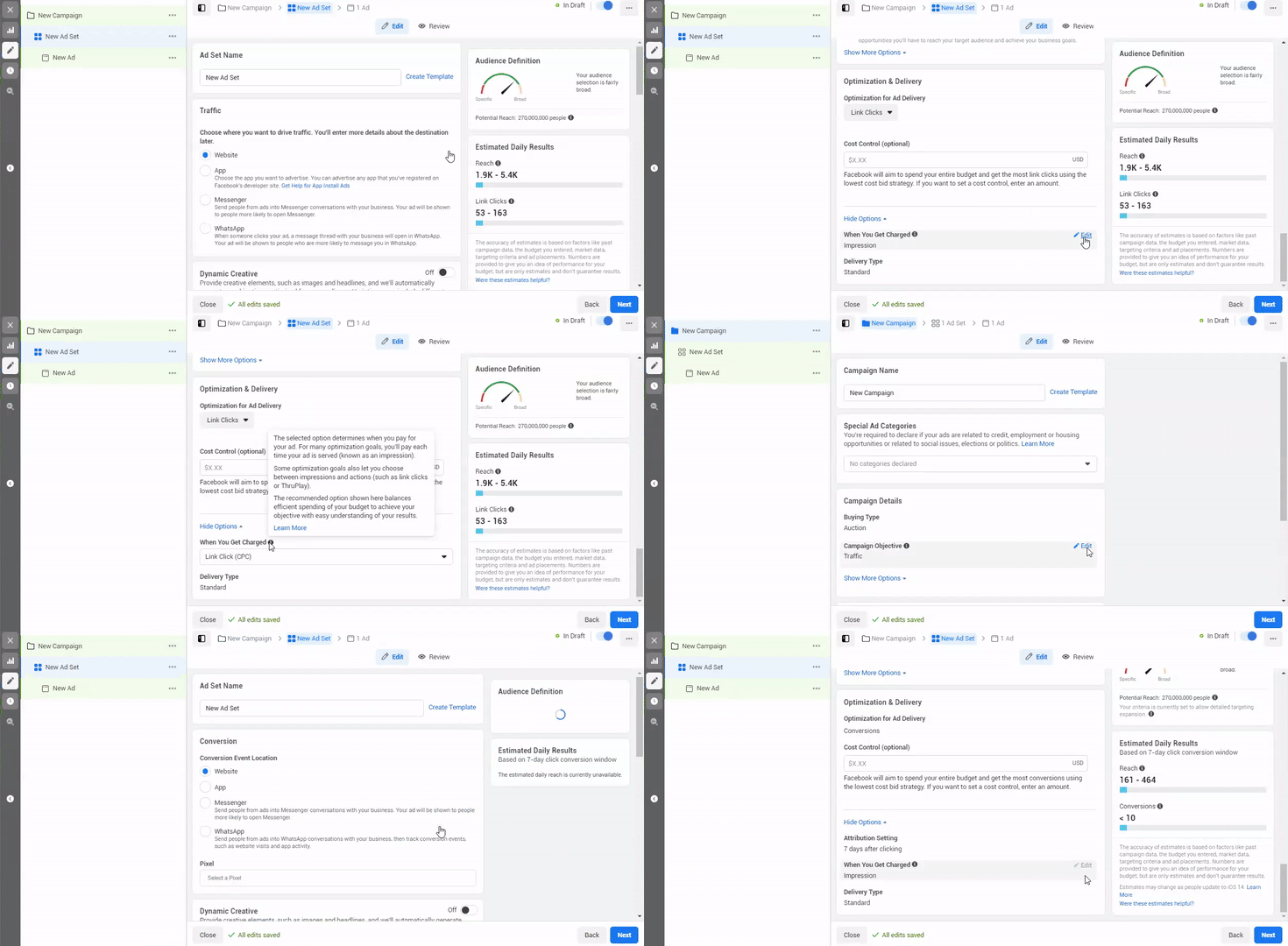
So some campaigns give you options, while some don’t.
But whatever selection is made there, it means you will be charged by that metric.
For instance, how many impressions you get or how many link clicks you get.
And it’s also important to note for first-time Instagram advertisers that you can absolutely cap how much your campaign spends.
Whether you want it to spend no more than a certain amount daily, or if you want to set it to a lifetime budget and set it that way.
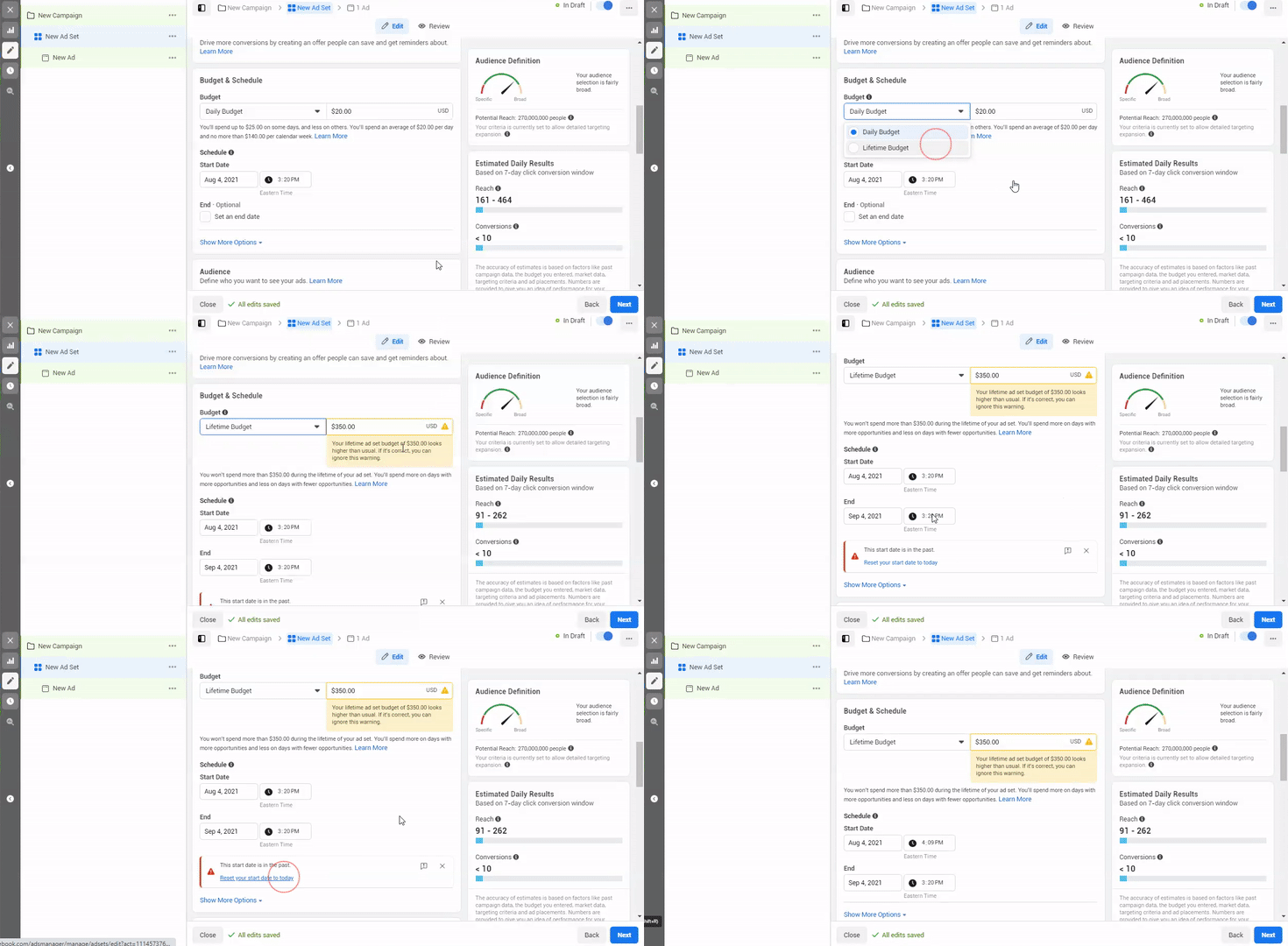
You can feel safe about setting a spending limit that Facebook and Instagram will not exceed.
So knowing all of this, you might be wondering, “What happens if I don’t get any link clicks or impressions? How am I charged?”
Facebook’s answer is… you’re not charged.
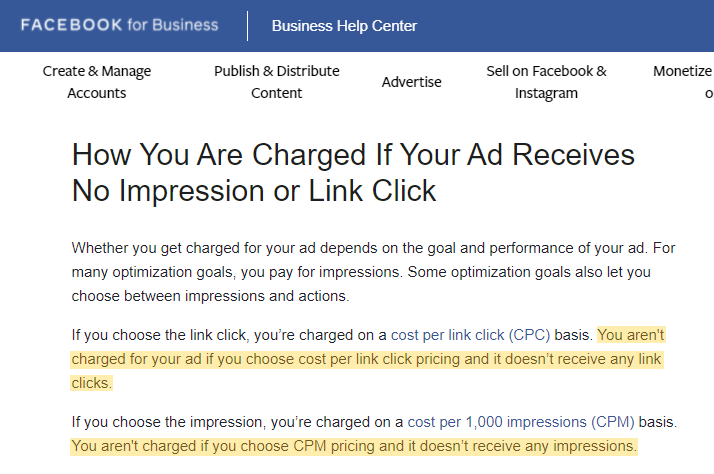
If you choose to be charged by link clicks and you don’t get any link clicks, they’re not charging you.
If you choose to be charged by impressions, and you don’t get any impressions, they’re not charging you.
But in our experience, you almost always get impressions, unless you’ve got something in your ad set that is set up poorly.
So keep that in mind that if you spend $300 on a conversion campaign wanting direct sales…
…but you don’t get any conversions, you’re still going to be charged $300 for all the impressions you got.
So that was our crash course in the way Instagram charges you.
7 Step Checklist On How To Lower Instagram Ad Costs
Now let’s get down to business with our 7 step checklist on how to lower your Instagram ad costs.
Keep in mind these are not listed in any particular order.
It’s actually more of a checklist that you can go down if you’re trying to get your cost per result lower.
As well as troubleshoot your campaign and maximize your returns.
1. Analyze your existing data
See what’s worked and what hasn’t.
When looking at your better-performing ads, what are the commonalities? Is there a certain demographic that is responding better to your ads?
Is there a certain content topic around your product or service that is gaining more attention?
For example, do people seem to respond more when you advertise about service A vs service B?
Take a look at whatever historical data you have and jot down any patterns you see.
It’s because this will guide you in creating more of what’s working.
If you don’t have any existing data yet, analyze what seems to be working well for your competitors.
Did you know you can go to a competitor’s Facebook business page, and see the ads they’re running?
This is how to do it:

- Go to their page, scroll down to the Page Transparency section.
- Click “See all” and scroll down to “Ads from this page”, and it will tell you if they’re running Facebook ads or not.
- If they are, then click “Ad library” and you can scroll through to see all the ads they’re running.
- And you can see from the little grey icons if they’re running the ad on Instagram as well.
Now it doesn’t show you the results of their ads, but if they’re a pretty successful company, they must be doing something right. Do you agree?
And at the very least you can see how they are addressing your shared target audience.
2. A/B split test, if you’re not already
Maybe on that first step, you found yourself thinking:
“I do have data, I have run ads, but it was basically the same ad every time. There aren’t really any differences to compare.”
If that’s the case, then you need to start A/B split testing different ads.
A/B split testing is “where you test multiple ads or ad sets out at the same time, with 1 variable changed among them, to see what performs best.”
So this could look like using the same copy with 4 different videos to see which video performs the best.
Or if you’re testing audiences, running the same exact ads to 4 different audiences to see which audience performs the best.
If you’re running all different ads to 4 different audiences, you won’t know what is making the ad campaign successful, the audience or the ad.
And you want to be able to pinpoint what’s driving results so you can capitalize on that.
For instance, if it’s the ad type that’s driving all the success, you want to be able to make more content similar to that ad.
If it’s the audience that’s driving success, you want to invest more money in that ad set to reach more of that audience.
From there, you can turn off the bad ads or ad sets that aren’t performing as well.
And this is a huge, very direct way to lower your Instagram ad costs.
Because for example, if you’re paying $90 per lead on one ad, and $60 per lead on another, you’ll want to turn off the ad where you’re paying a higher cost!
And then, reallocate the money spent on that ad to the better performing ad that’s getting you leads at a lower cost.
People who don’t A/B split test could be solely running the ad that’s generating results at $90 per lead and thinking, “wow this is great, I’m getting leads!”
That is even when the reality is they could be getting leads at a lower cost if they had just tested more.
Now we recently published a post on Facebook ad testing that also applies to IG (since Facebook owns Instagram). Be sure to read it next.
3. Use any existing customer data you have to your advantage
When talking about audiences that might have a lower cost per result, custom audiences are usually one of them.
And for the sake of this post, we’re going to break custom audiences down into two parts:
- lookalike audiences
- retargeting audiences
If you don’t know what lookalike and retargeting audiences are…
…or how to make them, we cover that extensively in our Facebook ads targeting post which you can read after this.
But basically, a retargeting audience includes anyone who is already familiar with your business to some degree.
This could be your email list, your website traffic, the people who have engaged with your Instagram posts lately, and so on.
Most people don’t convert with the first click to your site.
They need to get familiar with you before feeling comfortable enough to purchase or fill out a lead form.
But sadly, a lot of businesses fail to retarget, and thus, miss out on a lot of potential customers!
Retargeting can increase your conversion rate by 150%!
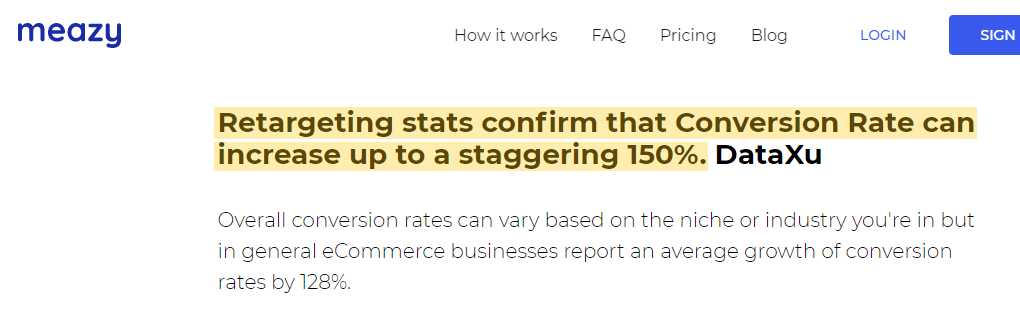
And in our experience with our clients, retargeting ad sets are almost always the cheaper ad set by a long shot in comparison to targeting cold audiences.
They convert at a cheaper cost because the audience is already familiar with your business.
You can also retarget existing customers to make repeat purchasers out of them, if that makes sense given the nature of your business.
So if you’re not already running retargeting ads, you need to be.
Now, a lookalike audience is a new group of people who have never heard of your business before.
And Facebook creates this group by analyzing an existing list you submit.
So for example, you can upload an email list of your existing customers.
You’re essentially telling Facebook to go find people who “look like” your customers.
So even though lookalike audiences are technically cold audiences, they’re still created from an extremely warm audience, making them more effective.
You want your original list to consist of about 1,000 people or more. And the warmer your original list, the better for your lookalike audience.
So ideally, you’d want to upload a list of customers.
But if you don’t have that many customers yet, you can start with your email subscriber list or your website traffic.
Overall, the point here is that you don’t want “getting the sale” to be the end of the road for a customer.
You can utilize all of your customer data to find more customers and drive more sales, if you use it properly.
4. Uncheck any placements that aren’t serving you well
This kind of falls in line with turning off your bad ads, like we talked about earlier.
In the same way that certain ads or audiences may not serve you as well, certain placements won’t either.
You need to know whether Instagram Stories is where you’re seeing the most return, or if it’s with the Reels ads.
Don’t burn money delivering to a placement that isn’t giving you any ROI.
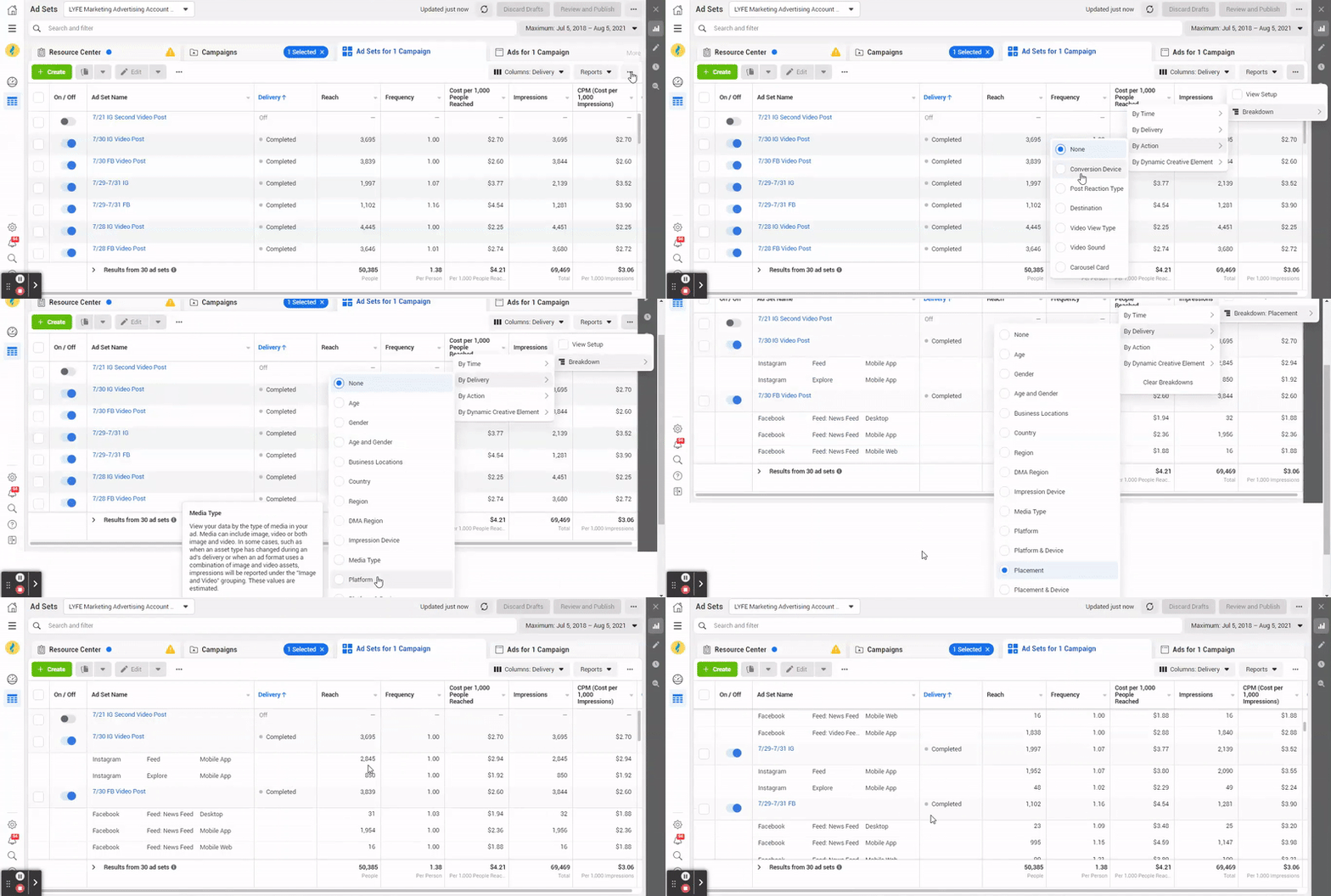
- Just head to your Ads Manager, and then look at the campaign you’re running.
- On the ad set screen, click the three dots on the right.
- Click breakdown, and by delivery, then placement.
And this will show you which placement within each ad set is performing the best.
5. Use the latest and greatest features
We discussed the new Reels ads placement in our previous Reels Ads for Beginners post, which you should also read…
…but you will more than likely see a cheaper cost per result if you use this placement for your Instagram ads, simply because it’s a new placement.
Instagram and Facebook want you to use their new features, so they’ll reward you for doing so by favoring you in the algorithm.
Plus, fewer advertisers are likely to be using the newer features yet, giving you more room in the ad space to dominate.
The cheaper you can deliver your ad, the more money you’ll keep from the sales.
Just keep in mind that if you do use Reels ads or any new feature, you want the ad to be intuitive to that feature.
So for example, Reels are usually short, entertaining, and on point.
So your ad should generally be the same, because that’s what people respond to well in that placement.
Just make sure that your content is optimized for the new features you’re utilizing.
6. Use video
We’ve said this before on our blog but video is the way of the future.
They are widely the preferred media type as:
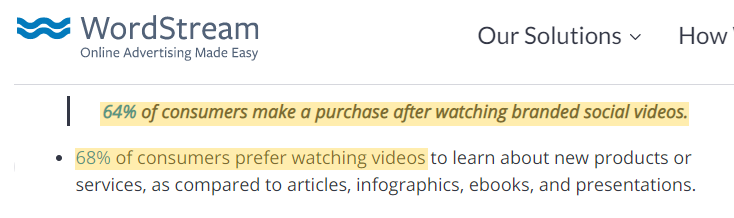
“68% of consumers prefer watching videos to learn about new products or services, as compared to articles, infographics, ebooks, and presentations.”
And more importantly, they convert higher:
“64% of consumers make a purchase after watching branded social videos.”
And if you’re hesitant to fiddle with video because it sounds like a daunting task, let us encourage you- creating videos does not have to be complicated.
We have some posts here on how to create short Facebook video ads and how to design Instagram ads for your business to help you get started.
But if you have a smartphone, you can create an effective Instagram video ad.
If you read our top ranking social media platforms post…
…you heard us talk about how for the Instagram Stories placement, “mobile-shot stories ads outperformed studio-shot ads by 63% of the time.”
So not only are video ads doable, but they are also likely to be more effective for an Instagram ad if you create it from your phone.
7. Double-check your campaign goal
If you have ticked off every other box on this checklist and you’re still not seeing lower Instagram ad costs, you may need to go back to the beginning.
Ask yourself, “does the campaign objective match my desired outcome?”
If you’re wanting more sales on your website, but you’re using the traffic campaign and not the conversion campaign…
…there lies your problem.
If you’re wanting more leads but are using the post engagement campaign, it’s the same thing.
We’ve seen a lot of newer Instagram advertisers make the mistake of picking the campaign that’s “easiest to use” instead of the most effective.
For example, the post engagement campaign we just mentioned doesn’t require you to install a pixel on your website, whereas the conversion campaign does.
Here’s our post on Facebook Pixel if you want to learn more about it.
But don’t let a little extra effort in the campaign setup deter you from using the campaign that’s going to be most beneficial to your business.
We hope this gives you more ideas on how you can lower your Instagram ad costs.
If you want a more comprehensive guide on how to perform stellar Instagram advertising, be sure to check out our social media ads webinar.
It was developed by one of our co-founders and shares all the secrets from our digital marketing agency on how to grow and succeed with social media ads.
Now if you need more help with your Instagram ads or social media ads in general, then check out our social media advertising services here.
Or get in touch with us today to talk to one of our team experts.
Other Instagram Advertising Resources
- 25 Instagram Advertising Examples To Inspire Your Campaign This 2026
- How To Create a Profitable Instagram Advertising Campaign That Drives Sales
- How to Create & Optimize Instagram Story Ads + Best Practices
- How to Create Instagram Story Ads + Drive Results
- App Install Campaigns on Instagram [An In-Depth Tutorial]
- Easy-to-Follow Guide on How to Create Instagram Ads
- Instagram Ad Strategy 2026: Step-by-step Guide
- How To Do Instagram Lead Ads: 5 Important Money-Burning Mistakes To Avoid
- How Much Should You Spend on Instagram Ads?
- 11 Instagram Ad Mistakes Businesses Should Avoid

