



TikTok is a social media platform where creativity meets an engaged community. Business owners, content creators, or individuals passionate about sharing ideas are all here for one primary reason: to connect.
But with the endless stream of short videos and trending content, how can we truly measure our impact? That’s where TikTok reporting metrics come into play.
While “metrics” might sound technical—bringing to mind spreadsheets and data—it doesn’t have to be overwhelming.
Most Important TikTok Metrics In 2026
The TikTok reporting metrics available in the native analytics app include:
By identifying key TikTok metrics to prioritize, you can focus on what truly matters and avoid data overload. Here are some other important metrics to track:
- Engagement Rate
- Viewership and Engagement Trends
- Video Reach
- Hashtag Performance
- Follower Growth
- Ideal Posting Times
What Are TikTok Metrics?
TikTok metrics are data points that measure the performance of your content on TikTok. They reveal how well your videos connect with your audience and show engagement, reach, and overall impact.
Think of TikTok metrics as a backstage pass, giving you insight into how well your content resonates with your audience. These aren’t just numbers; they’re valuable feedback to help you understand, refine, and amplify your presence on the platform.
If you want professionals to create short videos and manage all of your short video marketing for you, contact us for a free quote and proposal today.
How To Find TikTok Metrics From Native Analytics Dashboard
You can access the built-in native analytics of TikTok from your TikTok business account. Here’s how to access it from your TikTok profile:
- Go to your profile and click the ☰ menu.
- Select Creator tools.
- Click “View all” under “Overview” for a detailed look at your account analytics.

The native analytics dashboard provides essential TikTok metrics including an overview and the options for content, followers, and lives.
In the Overview tab, you’ll see your TikTok reporting metrics sorted by timeframes. You can view these metrics in 7-day, 28-day, or 60-day increments (or set a custom timeframe).
Let’s discuss all TikTok metrics in detail:
Native Analytics Dashboard – TikTok Metrics
1. TikTok Key Metrics
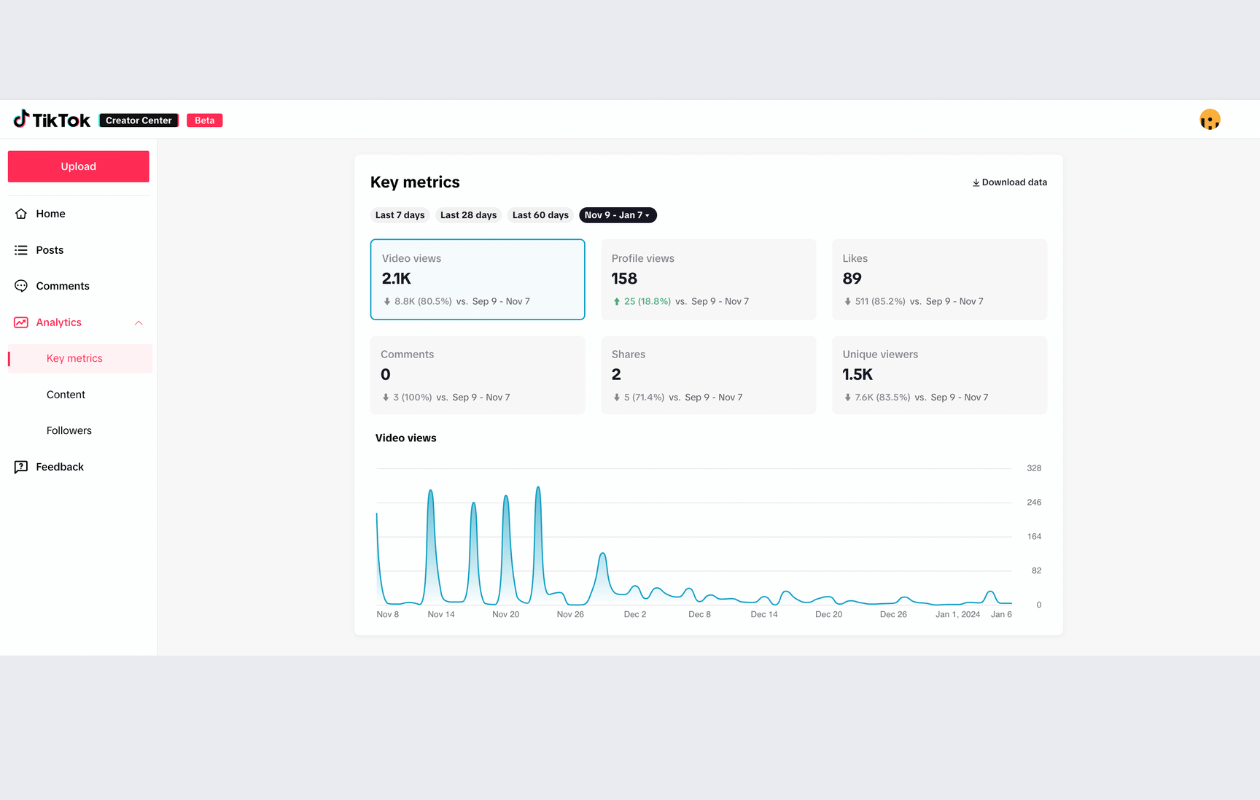
The first option you find in the TikTok native analytics dashboard is the “Key Metrics”. When you click the key metrics, it will show you the metrics for a certain timeframe.
You have the flexibility to change the timeframe by choosing from suggested options or selecting “Custom” to set your desired period. This feature allows you to access up to two months old data.
The following stats will be mentioned under the key TikTok metrics
- Video views
- Comments
- Profile views
- Shares
- Likes
- Unique viewers
You can click on the video views option and it will display a detailed graph of the views in the selected timeframe.
2. TikTok Performance Metrics
The second option is the Content Tab, which shows how your content is performing. This tab focuses on video posts and trending content, giving you detailed insights.
- Video Posts: This section displays your videos from the past seven days, sorted from newest to oldest.
- Trending Videos: Here, you can see your top nine videos with the fastest growth in views over the last seven days.
The performance tab provides details such as views, likes, comments, shares, and the number of people who saved the post. You can also click View Analytics to access full details.
3. TikTok Follower Metrics
This TikTok metrics tab displays key performance indicators (KPIs) for your followers, including details like their gender and location.
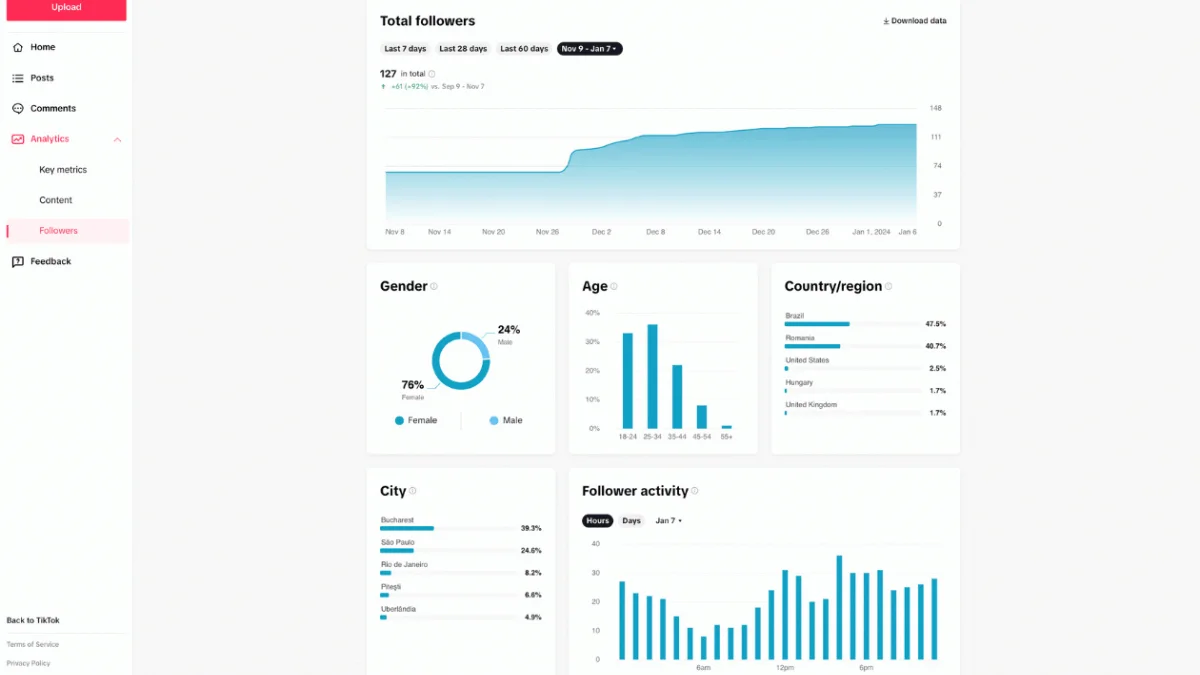
These insights help you adjust your strategy to match your audience’s preferences. The Follower tab provides the following metrics:
- Total Followers: The number of users following your account, including any changes over the selected period.
- Gender and Age: A breakdown of your followers by gender and age.
- Country/Region: Your followers’ countries are listed in order of follower count.
- Follower Activity: Information on when your followers are most active on TikTok.
Other Important TikTok Metrics
To grow your brand on TikTok, understanding engagement and reach is essential.
Knowing how your audience interacts with your content and how far it spreads will help you pinpoint your top-performing posts, enabling you to fine-tune your growth strategy effectively.
While the app provides useful TikTok metrics to measure your performance, third-party tools can offer even deeper insights.
We recommend using tools like Keyhole, TrendTok, or Exolyt to track these additional metrics.

Engagement on TikTok is divided into the following reporting metrics.
1. Engagement Rate
It is a vital statistic, often a function of likes, comments, shares, and video completions.
- Engagement rate per follower: An average engagement rate per follower of 5.7% signals robust interaction, which may be significantly higher than competing platforms.
- Total engagement: You can track your total engagement over a specific date range to measure improvements or identify content that resonates.
2. Viewership and Engagement Trends
- Likes per video: The average number of likes is a direct measure of content approval.
- Comments: Viewer responses can provide qualitative feedback on your content.
- Shares: Indicates the degree to which your content is distributed by users.
- Video completions: The number of times users watch your video until the end indicates retention effectiveness.
Integrating mentions in your videos can also improve engagement, suggesting a strategic approach to collaboration and user interaction.
3. Video Reach
It indicates the total number of unique users who see your content. This can be influenced by factors such as hashtag views and traffic sources.
4. Hashtag Views
Demonstrate the visibility gained from strategic TikTok hashtags use.
5. Follower Growth
- Net New Followers: This is a tally of followers gained over a specific period. Tracking the total number of times new followers are gained shows the growth trend of your profile.
- Traffic Sources: Understanding where your views come from can refine content strategy.
You can analyze this data to adjust and improve your approach to boost engagement and reach.
Best Time To Post On TikTok
If you want your social media marketing strategy to be successful, engaging content is not the only factor you need to keep in mind. Great post timing matters too.
Here’s a quick look at the best times to post on TikTok to help improve your TikTok marketing strategy.
- Monday: 6 AM, 10 AM, 10 PM
- Tuesday: 2 AM, 4 AM, 9 AM
- Wednesday: 7 AM, 8 AM, 11 PM
- Thursday: 9 AM, 12 AM, 7 PM
- Friday: 5 AM, 1 PM, 3 PM
- Saturday: 11 AM, 7 PM, 8 PM
- Sunday: 7 AM, 8 AM, 4 PM

5 Tips for Crafting Winning Content on TikTok for Your Small Business
1. Know Your Audience Inside Out
- Why it matters: Understanding your audience is like having a secret recipe; it ensures your content hits the mark every time.
- Actionable step: Dive deep into TikTok metrics. Identify your audience’s preferences, behaviors, and content consumption habits.
Are they drawn to tutorials, memes, or behind-the-scenes glimpses?
Tailor your content to meet these preferences and ensure each post creates a genuine connection.
2. Always Be Authentic
- Why it matters: TikTok is all about authenticity. Users want genuine moments, real stories, and relatable content.
- Actionable step: Stay true to your brand’s voice and values.
Share authentic stories, showcase real experiences, and engage with your community transparently.
Remember, authenticity builds trust, and trust translates to loyal customers eager to champion your business.
3. Use Trends Wisely
- Why it matters: Trends come and go, but using them strategically amplifies your content’s visibility and engagement potential.
- Actionable step: Stay updated with TikTok trends and challenges.
While it’s tempting to jump on every bandwagon, choose trends aligning with your brand and audience.
Add your unique touch and ensure your content stands out from the crowd.
4. Optimize Content for Mobile Viewing
- Why it matters: TikTok thrives on mobile consumption. Creating content for mobile helps users have a smooth experience. This keeps them engaged and encourages them to come back.
- Actionable step: Prioritize vertical video formats to ensure content clarity and accessibility on mobile devices.
Pay attention to visuals, captions, and audio elements, ensuring each component enhances user experience and engagement potential.
5. Engage, Engage, Engage
- Why it matters: Engagement isn’t a one-way street. When you actively connect with your audience, it builds community ties, loyalty, and support.
- Actionable step: Respond to comments, engage with user-generated content, and foster community interactions.
Host Q&A sessions, ask for feedback, and work with influencers and followers. This approach helps your community feel valued, listened to, and connected.
Crafting successful content on TikTok isn’t rocket science; it’s a blend of understanding, authenticity, strategy, and engagement.
By implementing these five tips, TikTok reporting metrics will show positive results. You’re not just posting content; you’re building a vibrant community eager to champion your small business.
TikTok Metrics FAQs
What are TikTok metrics?
TikTok metrics are insights into how well your videos perform and how engaged your audience is with your content. You can track these metrics to find new ways to increase views, optimize your TikTok strategy, and connect more effectively with your target audience.
How to set TikTok KPIs?
Here are 5 simple steps to set TikTok KPIs
- Identify your KPIs.
- Set specific targets.
- Track your TikTok metrics.
- Analyze the data.
- Make data-driven decisions.
You can track these TikTok metrics by using the TikTok analytics dashboard or any other external software.
What is the reach metrics of TikTok?
The Reach TikTok metrics refers to the number of people who see your post. Reach helps measure the potential audience size and exposure for your ad campaigns or future posts.
How are TikTok views measured?
The number of times your video starts playing is counted as a view. Also, each impression counts, while replays are not counted. This means the view count only includes the initial play of your video.
Other TikTok Marketing Resources
- Top 20 TikTok Agencies In The US 2026
- How To Sell on TikTok Shop: 7 Foolproof Steps 2026
- 18 TikTok Tips To Increase Your Social Media Engagement
- 10 TikTok Marketing Examples
- A Complete Guide to Create a TikTok Marketing Strategy
- TikTok vs Instagram: Which is Better For Your Small Business?
- TikTok Retargeting Tips: How to Run Retargeting Ads + Strategy
- Grow Your Business With Effective TikTok Marketing
- A Complete Guide on TikTok Ads for Beginners in 2026

