




TikTok has evolved beyond a social media platform for just dancing, skits, and tutorials. Today, it’s a hub where people actively discover and buy products. If you’re a business owner looking to tap into this social commerce opportunity to grow your sales, this article is for you.
Let’s see how to sell on TikTok Shop, tips on how to create effective content, and tips on how to increase your ROI.
Check out our TikTok management services if you want help creating short-form videos for your business.
How To Sell On TikTok Shop: 7 Easy Steps For 2026
To start selling products on TT Shop, you need to create a TikTok seller account. This process is different from setting up a regular TikTok account, but don’t worry—we’ll guide you through it.
Let’s look at the 7 simple steps to set up your business and start selling on TikTok Shop.
Step 1: Create A TikTok Shop Account
Go to the TikTok Seller Center and choose your region. Right now TT shop is only available in the following countries:
- United States
- Indonesia
- Malaysia
- Thailand
- Philippines
- Vietnam
- United Kingdom
- Spain (Invite only)
- Ireland (Invite only)
You’ll be taken to a new page where you can either sign up or log in. Enter your details to create a TikTok Shop account.

Please note that if you already have a TikTok business account, you can use the same login information, so you won’t need to register again.
When the registration is complete, you will receive a welcome message. There you have it – you now have a TikTok Shop account!
Step 2: Complete The Verification Process
You need to verify your TikTok Shop account, by adding details about your business and uploading several documents. The required information includes:
- Business Type
- TikTok Shop Name
- Primary Product/Service
- Business Phone Number
- Registered Business Name
- Federal Tax Identification Number
- Business Address
- Business Partners (if applicable)
TikTok typically takes about 24 hours to complete the verification process. Once your account is verified, you’ll be redirected to your dashboard.
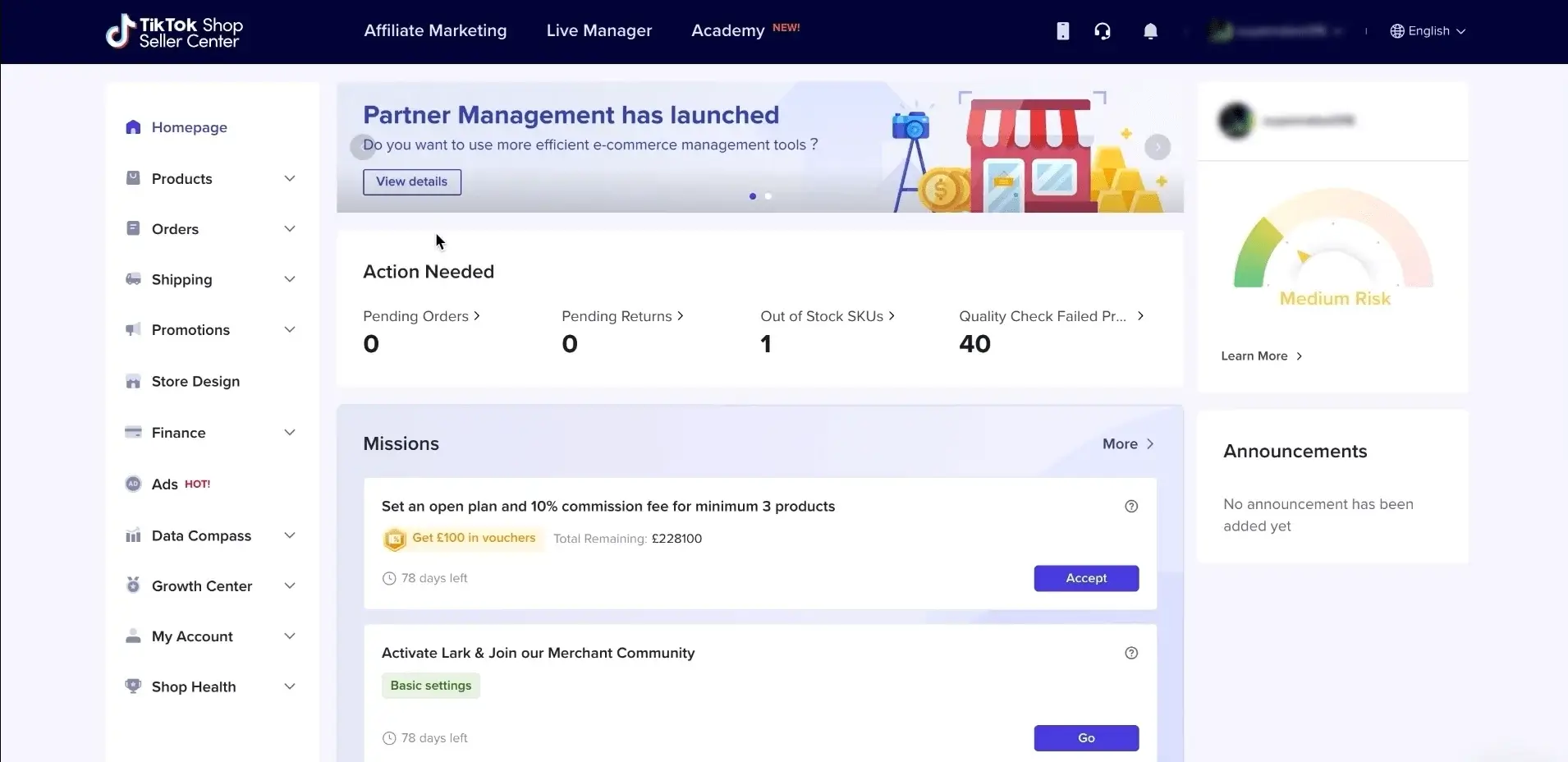
If you see the dashboard, congratulations! Your account is now verified.
Step 3: Add Products To Your TikTok Shop
Now it’s time to add your product. On the dashboard, locate the Must-do Mission section.
Click on the option to upload a product, and you will see two options:
- Import product from an existing e-commerce platform
- Manually upload the products
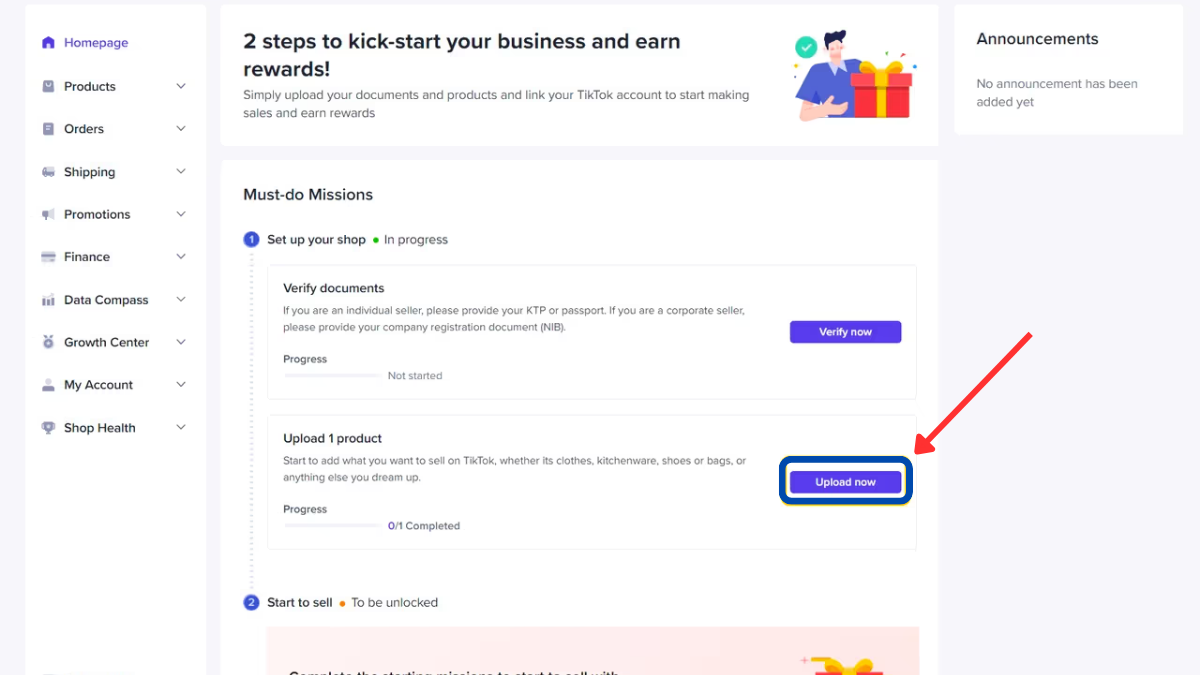
You can import products from platforms like Amazon, Shopify, Square, and BigCommerce. If you have an existing e-commerce store, simply sync it with your TikTok Shop to import your products.
If not, you can manually upload them using the “Upload Now” button on the dashboard.
To upload products manually, download the product sheet template and fill in the details. Be sure to download the template specific to your product category.
You’ll need to enter details like product names, descriptions, parcel weight and dimensions, price, quantity, product images, and attributes in the template spreadsheet.
Upload the completed template to the TikTok Shop dashboard and preview the uploaded products to ensure everything is correct.
Once you’ve confirmed the details, click “Confirm” to start the import process. To double-check, click the “Products” tab on the left menu bar of the dashboard.
The TikTok Shop team will review and approve your products within 24 hours, so you should see them listed under the “Pending” option.
Step 4: Link Your TikTok Shop To Your TikTok Account
Go to your TikTok Shop dashboard and click on “Get Started” next to “Connect your shop to a TikTok account.”
On the redirected page, click the “Link Official Account“. A dialog box will appear, with a QR code.

Scan the QR code with the TikTok profile you want to link. To find the scan icon, click the three lines in the top right corner of your TikTok app.
It’s simple, right?
The account you link to your TikTok Shop must be a TikTok business account. If your account isn’t already a business account, it will be automatically converted.
Step 5: Create Engaging Content With Product Links
It’s time to market your products! You should begin with shoppable videos as they are the best option to market without making it obvious.
For the best results, we suggest using user-generated content (UGC) and collaborating with content creators to showcase your products.
Hiring creators can help you reach more people and build trust, as users often trust people like them promoting products.
It’s like influencer marketing but in a genuine way, just like regular TikTok content.
How To Add Product Tags?
You can add product tags to your TikTok videos using these simple steps:
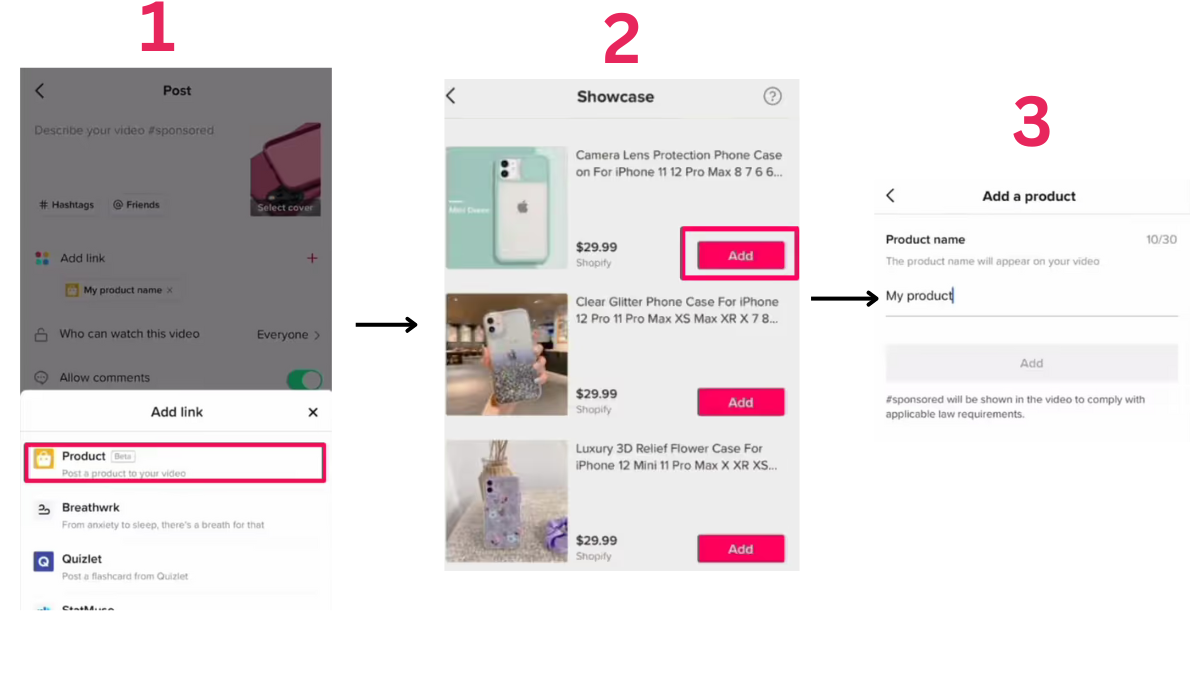
Upload the content you want to tag with a product. In the post menu, click the Add link option and select “Product.”
Select the product you want to promote and click “Add”. Enter the product name as you want it to appear in the video, then click “Add” to continue.
You can repeat this for multiple products. Once you’re finished, review your video and post it.
Step 6: Run TikTok Shop Ads
The second way to grow your TikTok account is through ads. Running ads for your TikTok Shop is different from the typical ads on a personal TikTok profile.
How To Run TikTok Shop Ads
Go to TikTok Ads Manager and create a new campaign. Select your campaign objective and product source. Here’s what you should choose:
- Campaign Objective: Product Sales
- Product Source: TikTok Shop
The rest of the details are pretty much the same. You need to select the ad name, budget, placement type, and other details.
Next, set up the ad group to specify your target audience. Select a bidding option, audience demographics, and other relevant settings.
We recommend setting the ad type to Video Shopping Ads and selecting an age range of 18+ for your target audience.
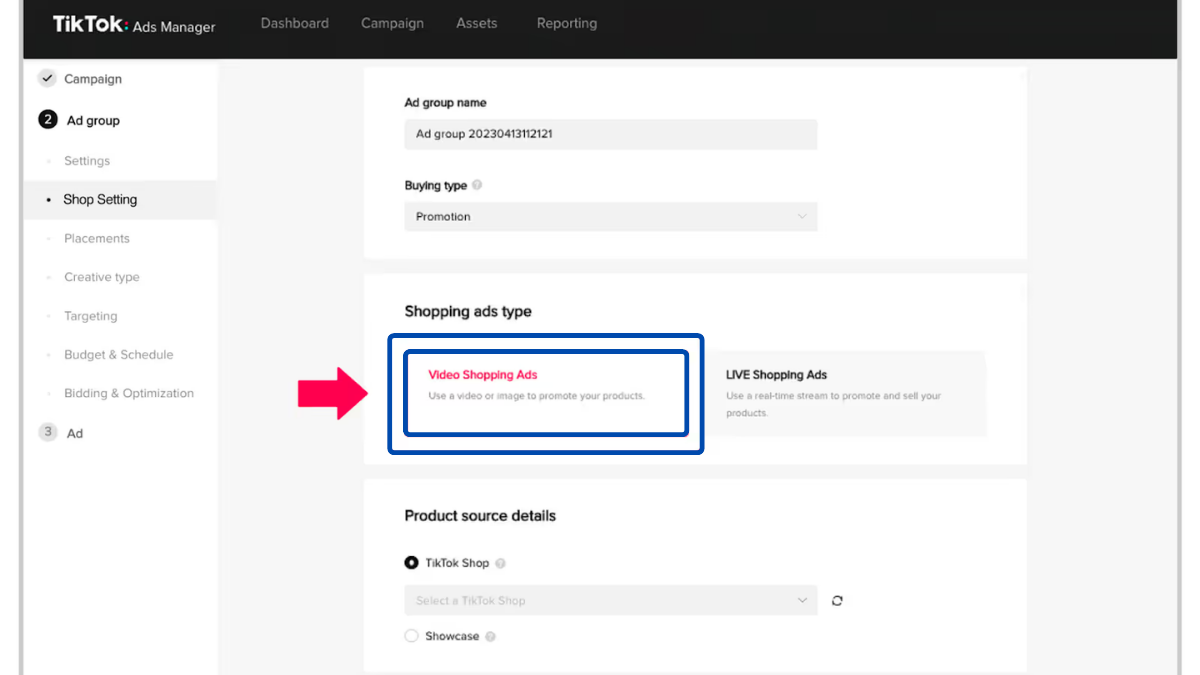
How To Create TikTok Shop Ad
First, choose the identity from which you want to run the ads—either your own account or that of an influencer. Once that’s decided, select the products you want to promote.
Add text for your ad, and include hashtags to get more views on TikTok. Hashtags like #tiktokmademebuyit can help you reach a bigger audience.
Hit the submit button and your TT shop ad campaign is live.
Step 7: Sign up for the TikTok Shop Affiliate
To further increase your sales on the TT shop you should run affiliate programs. If you’re a small business with a limited budget and can’t run TikTok ads, affiliate programs are your best bet.
You can use the affiliate program to collaborate with content creators who sell products for you. The best part is you only pay them a commission on successful sales.
How To Register For TikTok Affiliate Program
Here are the steps you can take to register for the TikTok Shop Affiliate program.
- Login to TT Shop Seller Center.
- Choose the Affiliate marketing option. It will appear at the top.
- Select a plan that works best for you.
TikTok provides three different affiliate plans:
- Shop Plan: To use this option, you must set a commission rate for all the products listed in your TikTok Shop.
- Open Plan: Make your products available to all creators, allowing them to apply to promote specific products. They can start promoting only after your approval for that product.
- Targeted Plan: In this plan, you collaborate with selected creators to promote your product.
Is It Worth Selling on TikTok Shop?
Selling on TikTok Shop is definitely worth it. Let’s break down why:
TikTok is one of the fastest-growing social media platforms, with around 143 million active users in the U.S. alone. So visibility is clearly not an issue. That’s not even the best part!
Research shows that 37% of TikTok users want to buy a product the first time they see it and they are 1.5 times more likely to make a purchase compared to users on other platforms.
There is more! 1 in 4 TikTok users prefer buying from TikTok livestreams, where they can see a full product demo instead of just pictures.
We’ve helped thousands of clients, including Sherman Standberry (@shermanthecpa), grow their business on TikTok. Sherman shared his success, saying:
“Working with LYFE Marketing has transformed my online presence. Through short videos on TikTok, we’ve gained millions of views, with one video alone reaching over 284K views and 17.9K likes.”
Want to grow your business on TikTok? Check out our Short Form Video Agency!
Let’s explore how TikTok Shop works.
How TikTok Shop Works?
TT Shop or TikTok Shop is the integrated online store for the video-sharing platform.
Think of it like Shopify, but with much more entertainment and engagement, allowing you as a seller to build genuine connections with your community.
You can showcase your products to potential customers through TikTok Shop, making it a digital doorstep for your business.
People will discover your products on their For You page with the option to make a purchase without leaving the social media platform.
These options are available on other platforms like Facebook and Instagram, right? Here is what sets TikTok apart:

1. Live Shopping
With this social commerce feature, you can demonstrate your product in real-time during live stream events. Viewers can purchase the items tagged in the stream, which appear as clickable pins for easy access.
They can simply click on the pin to add the product to their cart and check out directly within the app.
You can also wait until the live stream ends to browse the items. For that, a shopping cart icon will appear in the bottom left corner of the screen.
2. Shoppable Videos
These are everyday TikTok videos that allow you to tag products. This way potential customers can buy products while scrolling through user-generated content.
You can add these shoppable videos to your e-commerce platform’s gallery. To create effective ads, keep them authentic like regular TikTok content and add the product icon you’re showcasing.
3. In-app Storefronts
This is your product page or shop front in the TikTok in-app shop. It can be customized to match your branding and enhance the customer experience.
4. Shop Tab
This is also referred to as your product showcase. You can add a product catalog to your TikTok profile here, enabling users to browse, read reviews, and make purchases.
Tools For TikTok Seller
TikTok Shop provides various tools to help TikTok sellers grow their business.
- Shop Ads: TikTok allows you to run paid ads to promote your products and TT shop.
- Affiliate Program: You can collaborate with content creators to promote your products in exchange for a commission.
- Secure checkout: It ensures a smooth and fast payment process for customers.
- Fulfilled by TikTok: TikTok provides logistics solutions to help sellers manage their inventory and shipping.
What Are The Costs To Sell On TikTok Shop?
TikTok Shop can be set up for free, but that doesn’t mean there are no costs involved. Once your account is set up, you’ll need to run ads to promote your TT shop.
Here’s a breakdown of expenses you might face when running a TikTok Shop or using related services.
| Expense | Estimated Cost |
| Creating a TikTok Account | Free |
| Hiring a content creator | $100 – $2000 |
| TikTok shop ads | CPM $10 per 1k views |
| Commission Fee | 5% commission fee from merchants |
TikTok Shop FAQs
How do you become a TikTok Shop seller?
To register as a TikTok seller, go to the TikTok Seller Center. Select your region and complete the application. Next, upload the necessary documents, including your business information, ID, and proof of residency. TikTok will verify your details within 24 hours and confirm your status as a certified seller.
How do I sell items on TikTok Shop?
Here are 4 simple steps to sell items on TikTok
- Sign up for TikTok Shop.
- Verify your account details and business information to register your TT Shop account.
- Add products to your TT Shop.
- Promote your TIkTok Shop and products.
How much does it cost to sell on TikTok Shop?
Creating a TT shop account on TikTok is free but running ad campaigns and hiring influencers can cost you around $500-$2,000.
Can anyone sell on TikTok Shop?
No, as of now the TikTok Shop is available in the United States, United Kingdom, Indonesia, Malaysia, Thailand, Philippines, and Vietnam.
Is selling on TikTok Shop worth it?
Yes, selling on TikTok Sop is worth it. It offers a complete in-app shopping experience, making it an ideal platform for buying and selling products.
What documents are required to sign up for TikTok Shop?
The following documents are required to sign up on TikTok.
- Your Shop Name.
- Your ID, passport, or driver’s license.
- If you have business partners you need to upload documents to prove you’re a legal representative
- Your business details: business license or official documents that prove your eligibility to sell your products or services under the law.
Can I sign up for TikTok Shop if I don’t have any followers on my TikTok account?
TikTok does not have a specified minimum follower count for setting up a TikTok Shop. However, it’s a good idea to build a follower base first because it can help you promote your shop and products.
What products are prohibited to sell on TikTok Shop?
The following products are prohibited for sale on TikTok Shop:
- Drugs and Alcohol (both legal and illegal)
- Tobacco and nicotine products
- Adult products
- Animals and animal products
- Wellness products
- Baby and maternity products
- Discriminatory or offensive products
Other TikTok Marketing Resources
- Top 20 TikTok Agencies In The US 2026
- TikTok Metrics To Track in 2026
- 18 TikTok Tips To Increase Your Social Media Engagement
- 10 TikTok Marketing Examples
- A Complete Guide to Create a TikTok Marketing Strategy
- TikTok vs Instagram: Which is Better For Your Small Business?
- TikTok Retargeting Tips: How to Run Retargeting Ads + Strategy
- Grow Your Business With Effective TikTok Marketing
- A Complete Guide on TikTok Ads for Beginners in 2026

